← Back to all work
Case Study · Enterprise Security

Certificate Replacement

A tool that helps IT and security teams keep track of digital certificates across a company, and replace the ones about to expire before they cause a problem.

RoleLead Designer
TeamPM, Engineering, QA
ChallengeClarify and streamline a fragmented core product task

What it is, and who it's for

Every computer or piece of software that connects securely to something else relies on a digital certificate, a kind of ID card that proves the connection can be trusted. Certificates aren't permanent. They expire on a set schedule, and an expired one can break a connection or open a security gap.

Certificate Manager is the part of Tanium that keeps track of every certificate across a company's computers, flags the ones expiring soon, and walks someone through replacing them before that happens. It's used by IT and security teams responsible for making sure none of a company's certificates lapse unnoticed.

Certificate Manager overview dashboard
Overview. Select to enlarge

How it's used

Replacing a certificate is a multi-step process:

  1. Generate a request
  2. Take it to an outside certificate authority to get it signed
  3. Upload the signed result
  4. Package and deploy it to the right computers
  5. Remove the private key

Before this redesign, each of those steps lived on different pages — a certificate inventory page, an activity log, and a certificate detail page. The person doing the replacement had to hold the sequence in their head and navigate the product to match it, rather than the product guiding them through it.

I consolidated all of it into a single certificate inventory page with a streamlined replacement process. Every certificate's replacement status now shows directly in the list, which step it's on, and how many steps remain, so a team can see the state of every certificate in the company at a glance.

Certificate inventory list, showing replacement status for each certificate
Certificate Inventory. Select to enlarge

Making a confusing, fragmented sequence visible and streamlined

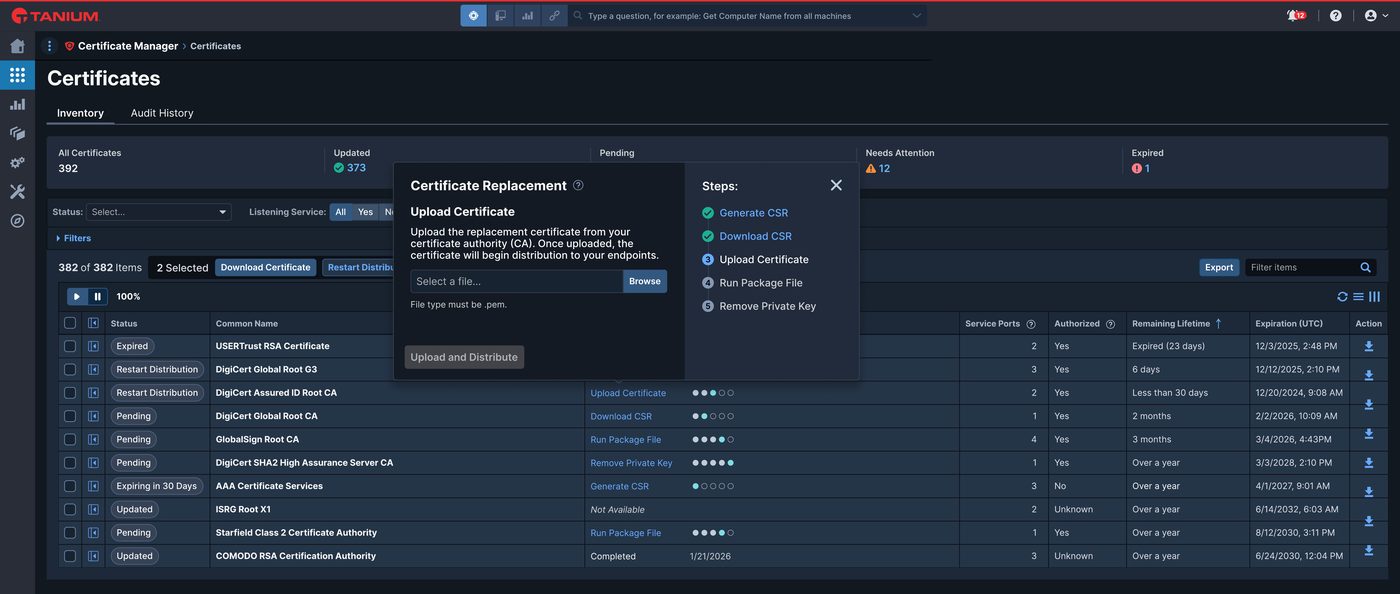
Replacing a certificate became a short wizard, launched directly from the inventory grid instead of a separate page. It walks a user through the five steps in order and always shows which step is current and which steps are already done.

Certificate Replacement wizard, mid-flow at the Upload Certificate step
Certificate Replacement Wizard. Select to enlarge

I designed every state the wizard could be in for each of the five steps, so engineering had a complete reference for how the product should behave at every point in the process.

Design specification showing the wizard's default, in-process, and completed states for each step
Wizard Steps by State. Select to enlarge

Instead of a separate detail page, a certificate's full information opens in a side panel next to the grid. A user can check on one certificate, or see exactly where a replacement stands across every computer it affects, without losing their place in the list.

Certificate inventory grid with the details side panel open for a selected certificate
Certificate Detail Panel. Select to enlarge
Certificate detail side panel, showing subject and issuer information and replacement status by endpoint
Full Certificate Detail Panel. Select to enlarge

Takeaways

I left the company before this project was made, but early initial user feedback from beta testing received positive feedback. Users found the streamlined process much more intuitive. After this initial rollout, the plan was to establish a dedicated connection to a certificate authority, so the wizard could be further simplified to combine the first three steps into one, making it a required two-step process with a third optional step.