← Back to all work
Case Study · Enterprise Security

Threat Navigator

A tool that helps security teams investigate potential cyberattacks in an organized, repeatable way, built into Tanium's security platform.

RoleLead Designer
TeamPM, Engineering, QA, Threat Hunters
ChallengeCreate a unified place to test and track security hypotheses

What it is, and who it's for

Companies use security software like Tanium to monitor thousands of computers for signs of a cyberattack. Some of that work happens automatically, but a lot of it depends on threat hunters — security analysts who proactively look for evidence of an attack that automated systems might miss, rather than waiting for an alert to tell them something is wrong.

Before Threat Navigator that hunting work happened outside the product in personal notes, spreadsheets, or separate scripts. Threat Navigator brings that investigative work directly into Tanium, so a hunt can be organized, saved, and revisited.
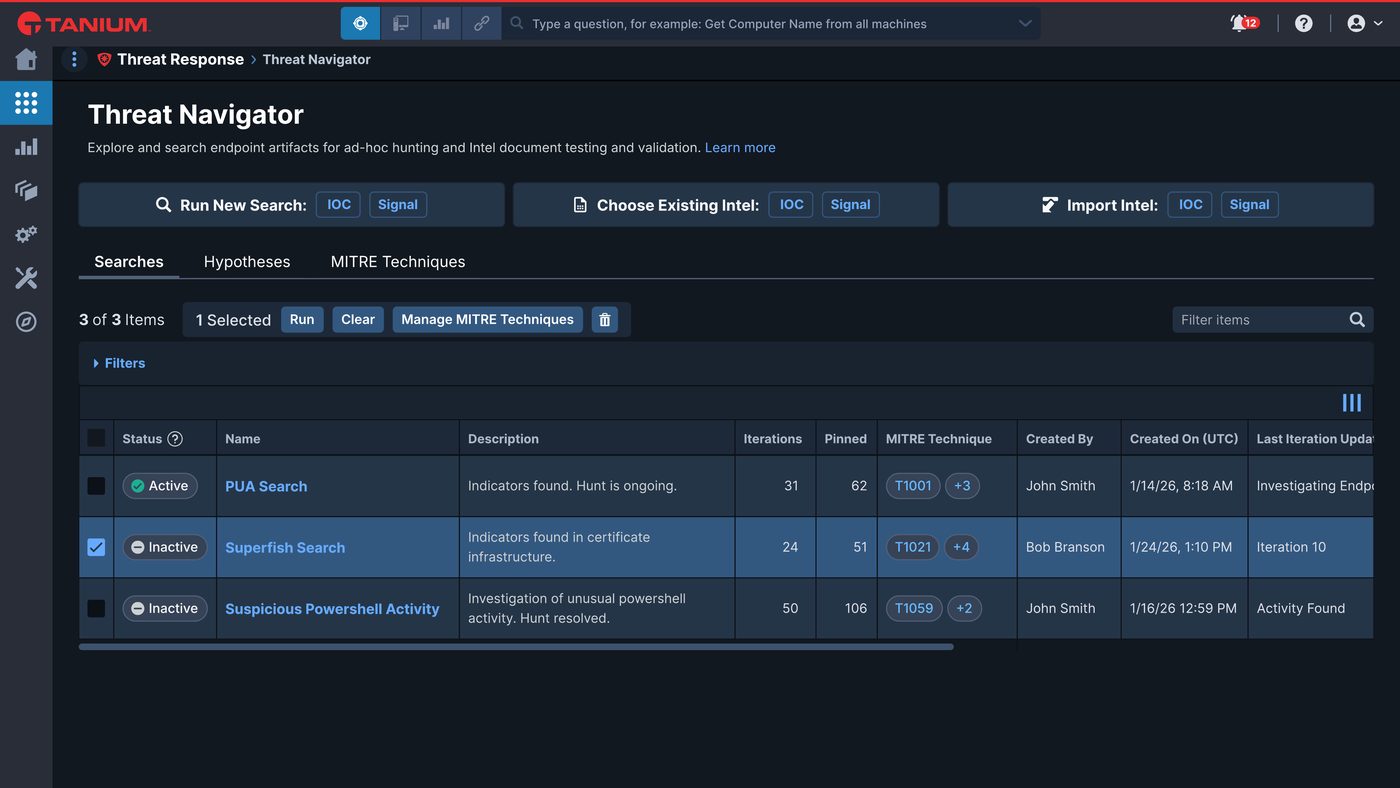
Threat Navigator search list view
Search List View. Select to enlarge

How it's used

A threat hunter starts by running a search for something suspicious such as a specific file, a pattern of activity, or a known indicator of compromise. Searches are run iteratively as the hunter narrows in on what matters, adjusting based on what comes back. Interesting results can be saved and pinned, so nothing gets lost as the search changes.

Threat Navigator search results
Search Results. Select to enlarge

Investigations can be tagged against MITRE ATT&CK, an industry-standard reference for categorizing attacker behavior, so a security team can see which kinds of threats they've actually looked into and which they haven't.

MITRE Techniques reference page
MITRE Techniques. Select to enlarge

Related searches, along with any supporting evidence, can be grouped into a single hypothesis that documents what was searched, what was found, and why it mattered, instead of that context living in someone's head or a personal notebook.

Hypothesis detail view, showing related searches and intel grouped together
Hypothesis Detail Panel. Select to enlarge

Designing a search history that matched the dynamic, iterative workflow of threat hunters

Hunters often need to revisit an old search and branch it into a new line of investigation, without losing track of where that idea came from. The challenge was finding a way to display a growing, branching history that would still make sense after fifty or more attempts.

I designed the search history as a visual, tree-like timeline — each new attempt branching off the one it came from, with older branches collapsible so the view didn't get overwhelming. This approach evolved over several design rounds working directly with threat hunters to ensure it best matched their processes.

Version history panel, showing a branching timeline of past search attempts
Version History. Select to enlarge

Takeaways

Threat Navigator shipped as part of Tanium's security platform and went through beta testing with real threat hunters, receiving positive feedback during that period. Initial launch has been well received by users as a meaningful evolution of the product.

Public sources: Tanium Tech Talks — Threat Navigator